


CREATE IMPACTFUL GROWTH OPPORTUNITIES
API and System Integration Services
Add more intelligence to your software by integrating your systems. Automate manual processes, gain new insights, improve your SaaS product, and more.

CREATE CENTRALIZED PROCESSES
Bring information together to streamline workflows
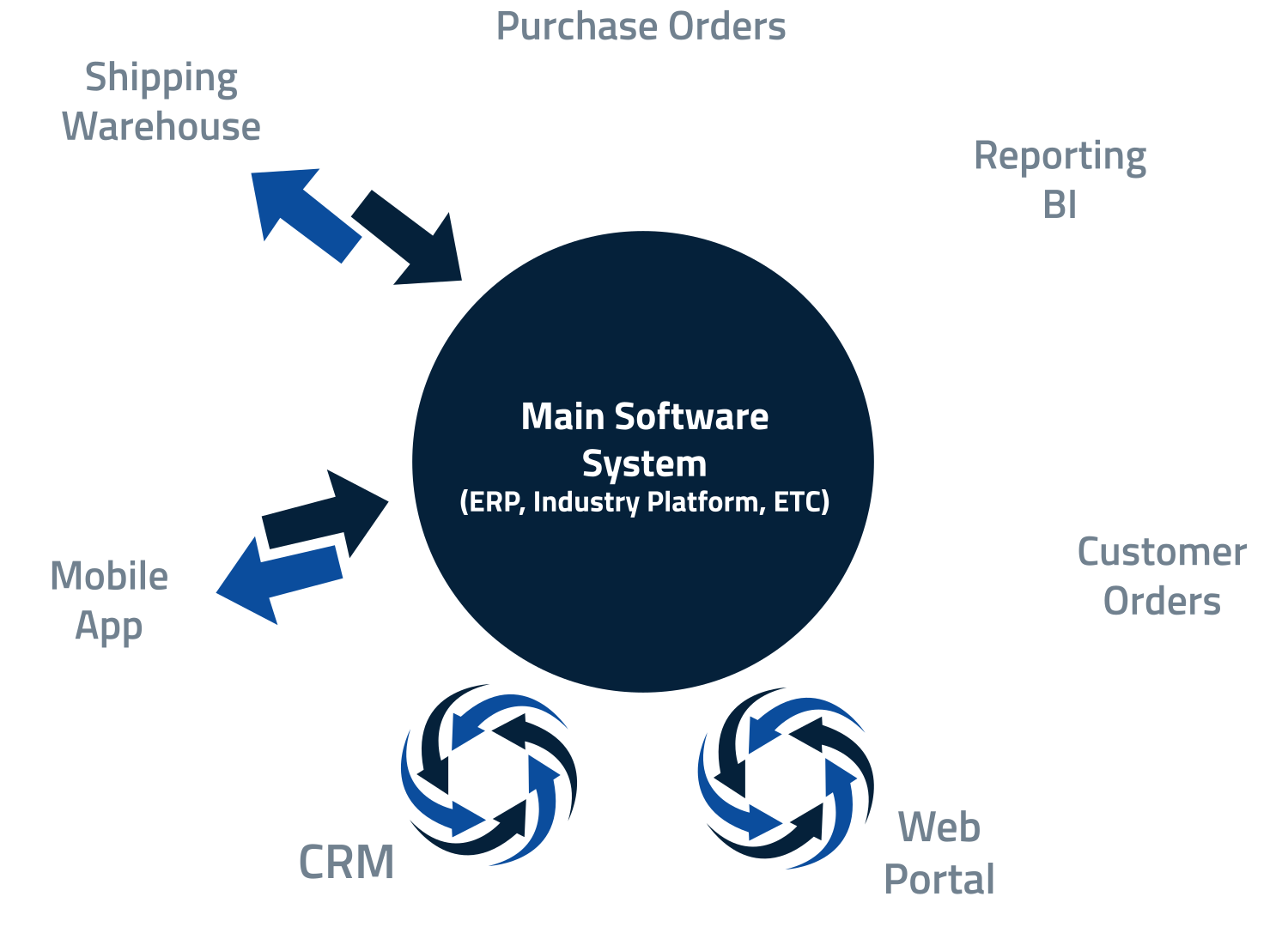
Software integration is a process where separate systems are combined into a single, more extensive system that can accommodate ongoing requirements as your business evolves. We can handle any type of integration with any size complexity.
One-way integrations
Push or pull information from one system to another. Automate manual data entry processes to drastically reduce human error and operating costs.
Two-way integrations
Eliminate cross-departmental data silos to establish an automated, single source of truth across the enterprise. Two-way integration allows the connected apps to stay synchronized regardless of where data is entered.
Complex data synchronization
Build secure, high-availability API connections that seamlessly link your ERP, CRM, EMR, and cloud software to synchronize data flow and simplify reporting & accessibility.
Tools we use
We have expert knowledge in APIs, File Exports/Imports, Data Translation & Transformation, XML, JSON, HL7, 3rd-Party Tools, EDI, and many others.
MAXIMIZE PRODUCTIVITY FOR YOUR TEAM
Commonly Integrated Systems
Discover examples of popular industries and solutions that can benefit from better data interactivity and availability.
Industries
Solutions
- Accounting & ERP Systems
- CRM & Contact Management
- Inventory Management
- Electronic Health Records
- And more!

Case Study
Saving time and reducing costs with a custom scheduling integration
This client wanted to connect multiple systems and enable online appointment scheduling.
After working with us, their synchronized systems share data in real-time, minimize admin scheduling duties, and lower overhead costs.
API SOLUTIONS TAILORED TO YOUR NEEDS
Improve information sharing across applications
Add functionality to your software through connections and automations that improve business processes. We can also assess API security and ensure your APIs transmit sensitive data securely.

Custom API Development

Mobile API Development

Web API Development

API Integration Services

API Security
OUR API DEVELOPMENT APPROACH
Streamline your systems with a fully customized solution
With APIs and custom integrations, you can share key information easily, see real-time updates, and reduce manual processes for your team.
Stage 1 – Vision to Reality
Communicate the vision of your integration and create a roadmap for success. Our team will easily convert your idea into the technical design for the planned integrations or APIs.
Stage 2 – Build & Test
Ensure results align with your expectations. Understand our real-world scenario tests and share feedback to confirm that your solution works exactly as intended.
Stage 3 – Deploy & Train
Equip employees with the tools to learn and adopt your new solution quickly. Our documentation and training keeps everyone on the same page.
Stage 4 – Ongoing Support
Receive 24/7 proactive monitoring on an ongoing basis so your integration processes and related systems keep running as they should.
Smart Automations and Integrations
Automating Workflows & Connecting Systems
One-Time Service Definitions — Automation Actions:
See examples of actions
2 more examples
One-Time Service Definitions — Automation Actions:
See examples of actions
2 more examples
One-Time Service Definitions — Automation Actions:
See examples of actions
2 more examples
One-Time Service Definitions — Automation Actions:
See examples of actions

Create a secure foundation of success
We specialize in building and integrating custom APIs that use the leading programming languages.
Our team leverages in-depth software expertise using a variety of tools—if you don’t see the solution you’re looking for, please contact us. We’re confident we can meet your needs!
Platforms
Software platforms that streamline and optimize business operations.
Database Platforms

Platforms for managing, storing, and accessing business data.
Code Frameworks

Code libraries that provide a foundation for our software development.
Tools

Our top applications and related software solutions.
Platform Solutions

Adobe Commerce

An enterprise-level ecommerce platform (formerly Magento Commerce) that offers customizable shopping experiences and powerful backend tools.
Android

A mobile operating system developed by Google, widely used on smartphones, tablets, and other smart devices.
AWS
A comprehensive cloud platform offering infrastructure, development tools, storage, databases, and computing services at scale.
Hubspot

A cloud-based CRM platform that offers tools for marketing, sales, customer service, and content management to help businesses grow.
Netsuite

A cloud-based enterprise resource planning (ERP) platform by Oracle that includes financials, CRM, inventory, and ecommerce capabilities.
Shopify

A cloud-based ecommerce platform that allows businesses to create, manage, and grow online stores with built-in tools and integrations.
Square POS

A point-of-sale system by Square that enables businesses to accept payments, manage inventory, and track sales from a mobile device or register.
Striven
An all-in-one business management software that combines CRM, accounting, HR, project management, and ERP tools in a unified platform.
Zendesk

A customer service and engagement platform offering tools for support ticketing, live chat, help centers, and customer relationship management.
And many more
Monday
A cloud-based work operating system that helps teams manage tasks, workflows, and projects through customizable boards and automations.
QuickBooks
An accounting software suite by Intuit for SMBs, covering invoicing, payroll, expenses, and financial reporting.
Salesforce
A leading cloud-based CRM platform that offers tools for sales, marketing, customer service, and app development.
ServiceChannel
A facilities management platform that helps businesses manage repair and maintenance operations through vendor coordination and analytics, all in one spot.
WooCommerce
A customizable, open-source ecommerce plugin for WordPress that enables businesses to sell products and services online.
WordPress
The world’s most popular content management system (CMS), used to build websites and blogs with themes, plugins, and a user-friendly interface.
ZoHo
A cloud-based suite of business applications that includes CRM, project management, email, finance, and productivity tools for SMBs.
Database Solutions
AWS RDS
A managed database service by AWS that simplifies the setup, operation, and scaling of relational databases in the cloud.
Azure – Cosmos DB

A fully managed NoSQL database service by Microsoft Azure, designed for globally distributed applications with low latency.
Microsoft Azure SQL Services

A family of fully managed, secure, and scalable relational database services built on SQL Server in the Azure cloud.
Microsoft SQL
A relational database management system (RDBMS) developed by Microsoft for storing, retrieving, and managing structured data.
MongoDB
A NoSQL document database known for its scalability and flexibility, using JSON-like documents to store data.
MySQL
An open-source relational database management system widely used for web applications and enterprise solutions.
Oracle Database

A proprietary multi-model database management system developed by Oracle.
PostgreSQL

A powerful, open-source object-relational database system known for its extensibility, data integrity, and SQL compliance.
And many more
Elasticsearch
A distributed, RESTful search and analytics engine used for real-time data storage and search, commonly part of the ELK Stack and built on top of Apache Lucene.
Redis
An open-source, in-memory key-value data store used for caching, real-time analytics, and high-performance application backends.

Code Frameworks

Laravel
A PHP web application framework with expressive syntax and tools for routing, authentication, and database management.

React
A JavaScript library developed by Facebook and maintained by Meta for building fast, interactive user interfaces for web and mobile applications.
Software Tools

Microsoft Azure Data Factory
A cloud-based data integration service that enables data movement, transformation, and orchestration at scale.
Microsoft Azure OpenAI

A managed service that brings OpenAI’s language models, including GPT, to enterprise applications via Azure’s secure cloud environment.
Microsoft CoPilot Studio

A platform to create custom AI assistants using Microsoft’s Copilot technology, integrating data, workflows, and automation.
Microsoft Power Apps

A low-code platform for rapidly building and deploying custom business applications across web and mobile.
Microsoft Power Automate

A cloud-based service that automates workflows across applications and services without writing extensive code.
Microsoft Power BI

A powerful data visualization and business analytics tool that helps users transform data into interactive insights and dashboards.
New Relic
An observability platform that helps developers monitor application performance, infrastructure health, and user experience in real time.

Case Study
Automating financial reporting with custom APIs
Before reaching out to us, this client spent days of manual effort each month generating financial reports.
By integrating their systems, they can now view real-time financial data, gain critical insights, and make more informed decisions.
CONNECTED AI SOLUTIONS
Integrate AI directly into your business systems
Depending on your needs, we can seamlessly integrate prebuilt AI solutions or a fully custom solution built by our team.

Custom AI Software
Develop a custom AI solution that increases efficiency and scalability.
Agentic AI
Save time and optimize workflows by leveraging agentic AI—automations powered by AI.

AI Chatbots
Improve customer service and employee success with secure chatbots trained on key knowledge bases.
HELPING PEOPLE ACCOMPLISH MORE
Our Raving Fans
We are not satisfied if you are just satisfied. We want you to be a Raving Fan as a result of providing the absolute best service!


Scott Stegenga
“Really responsive and helpful team that we work with in our SMB. They help with explanations to we regular folks and are open to any and all new ideas we propose. Thanks guys”
Kevin McCarthy
“Outstanding experience! Very professional and thorough and I couldn’t be more impressed with Miles and their recommendations! John Horner is a rockstar. Look forward to continuing to work with miles tech on future projects!”
Cheyenne Alvis
“an absolutely Fabulous company to deal with. The analysts are experts at their craft. Fast, concise, professional and extremely reliable. I consider them in high value and recommended regard. Thank you again to the entire team at Miles.”


Let’s build something great together.
Frequently Asked Questions
What is software integration?
Software integration is the process of combining different software applications or systems to allow them to work together seamlessly. The goal is to create a unified system that can share data and functionality, improving efficiency and reducing manual effort.
Why integrate software systems?
The main benefits of integrating systems are to streamline your business processes and minimize the number of different systems that people need to interact with. This helps improve the productivity and quality of operations, while saving time and costs.
Can old software be merged with new?
Yes, an important aspect of software integration is the process of transforming legacy systems’ data into new applications without having to retire your still-useful legacy systems. Joining these systems allows for them to grow, change, increase support, and allow for consistent information availability. We also help with system modernization, where you can migrate your old data to the latest platform.
Can you integrate with my industry-specific software even if it doesn’t have built-in integration itself?
Yes—as long as there is data being stored, and there is an ability to access that data (even through built-in reporting), we are able to integrate those systems together with your other key software. We specialize in creating integration where it is lacking or difficult to utilize.
Will systems integration increase the functionality of my software?
Yes. When disconnected systems require multiple manual steps, you lose valuable time and money. Pulling information together and creating a single centralized process saves time, effort, and costs by using the strengths of each individual system, while eliminating inefficiencies.
Do you handle API development, or do you just use existing ones?
We build fully-functional, custom web API’s and other integration tools specifically based on your needs and software systems. We leverage existing integration methods where possible, and combine them with custom code where needed in order to create a fully personalized solution that streamlines your systems.
My customer/supplier/partner has very specific integration needs. Can you help with that?
Yes! We are used to working with both industry standards for data & information systems, as well as unique and custom needs. We work with you to use standard applications where possible and create custom solutions where necessary.
What could cause my integration project to fail?
One of the most common causes of system failures comes with a lack of expertise in combining business process knowledge. People who do not have expertise in the data and integration processes will have a difficult time building an effective solution without getting caught up in the technical aspects. They may overestimate their capabilities and oversimplify the work and time needed. Another major issue is that employees can feel threatened by the changes. Convincing employees to adopt a new process takes time and effort, but we’ve outlined the process in this article.